

Picture an ordinary Tuesday morning. A business owner opens their laptop to check overnight enquiries and finds the website simply won't load. No warning, no obvious cause — just a blank page or an error message where their homepage used to be. The first reaction is usually confusion, followed quickly by a sinking realisation: there's no way to know, right now, how long this has been happening, how many customers have already tried and failed to reach the site, or whether this is a server hiccup or something far more serious.
This is the moment most businesses discover they never actually had a plan for this. Not because they're careless, but because downtime and hacking are the kind of problem that's easy to postpone thinking about — right up until it isn't.
This article looks honestly at what actually happens, operationally and financially, when a business website goes down or gets compromised, and what separates a business that recovers quickly from one that doesn't.
Most business owners understand, in the abstract, that "the website should stay up." Far fewer have actually thought through what happens in practice during an outage or breach — who notices first, who gets contacted, what the immediate priorities are, and how long each stage typically takes. Without that groundwork, an incident doesn't just cause downtime; it causes confusion on top of downtime, which almost always makes the disruption longer and more expensive than it needed to be.
The deeper issue is that a website outage or hack rarely stays contained to "the website." It touches marketing (ads pointing to a broken page), sales (enquiries that simply vanish), search visibility (rankings that can slip after repeated issues), and customer trust (which is slower to repair than any technical fix).
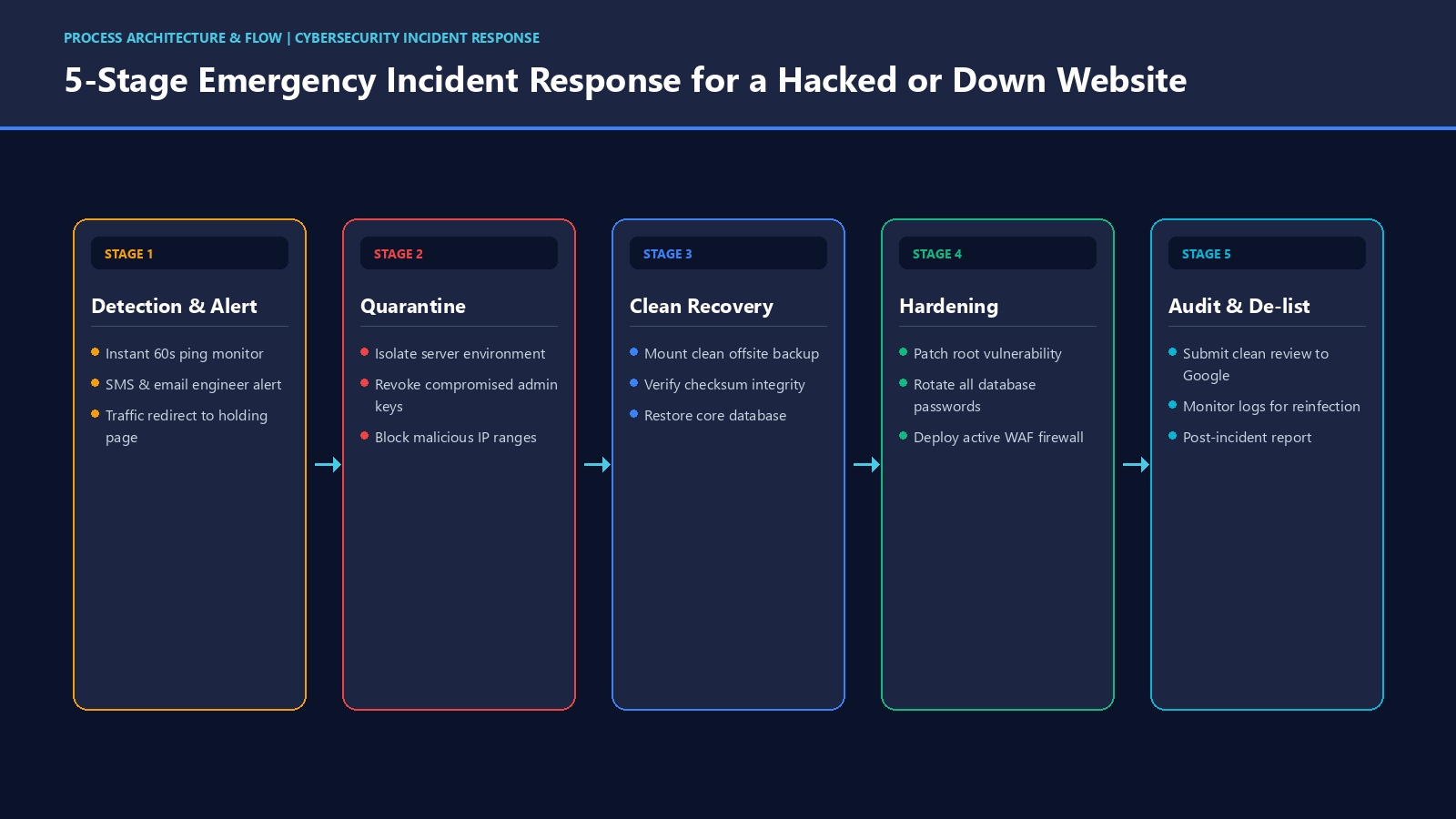
"The website is down" can mean several very different things underneath, and the right response depends on which one it actually is:
Each of these calls for a different first move, which is exactly why having a clear, pre-agreed response process matters more than any single technical fix.
Imagine a hypothetical boutique business running a festival-season sale, with paid ads actively driving traffic to the website. Partway through the campaign, the hosting account hits a resource limit during a burst of visitors, and the site starts timing out intermittently — sometimes loading, sometimes not. The marketing dashboard keeps showing clicks and spend; the sales dashboard doesn't show matching orders.
Nobody at the business notices for several hours, because everyone assumes slow traffic simply means a quieter sales day. By the time someone checks the site directly from outside the office network, a meaningful part of the ad budget has already been spent sending customers to a page that often wouldn't load. The fix itself — adjusting server resources — takes very little time once identified. Figuring out that there was a problem at all took far longer, and that delay is where most of the damage happened.
This kind of scenario is common precisely because it doesn't look like a "hack." It looks like ordinary bad luck — until you notice how much of it comes down to no one being alerted the moment something changed.

The gap between a quick recovery and a damaging one usually comes down to groundwork laid long before anything went wrong:
It helps to be concrete about where the real cost shows up, without resorting to invented percentages or guaranteed figures, because the honest answer is: it depends on your business, your traffic, and how long the issue runs.
A closely related question is whether the site was actually vulnerable in the first place. Our article on how to know whether your website is really safe from hackers walks through the warning signs and prevention side of this same problem.
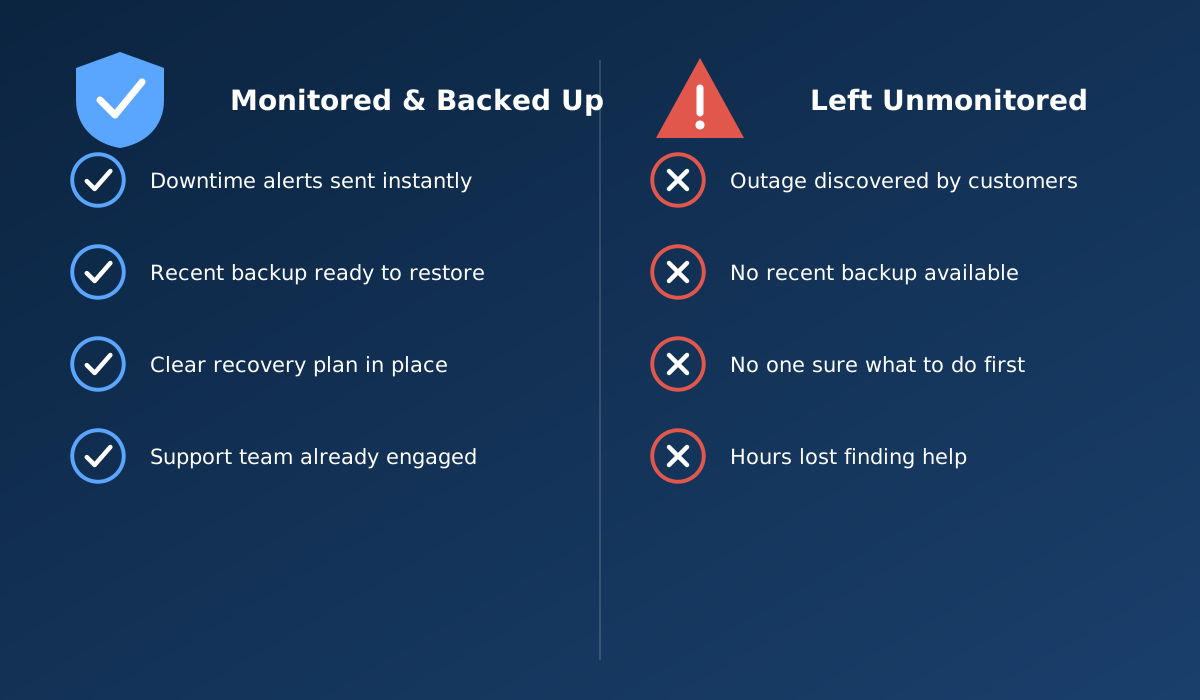
Two businesses can experience what is technically the same incident — the same type of outage or the same kind of compromise — and come out of it very differently, purely based on how the first few hours went. One business notices within minutes through an alert, has a recent backup ready, and knows exactly who to call. The other finds out from a customer hours later, has no recent backup to fall back on, and spends the first hour simply figuring out who should even be handling this. The underlying technical problem might be identical. The business outcome rarely is.
This is why "we'll deal with it if it happens" tends to be a weaker plan than it feels like in the moment. Decisions made calmly in advance — who to contact, where backups live, what the acceptable downtime looks like — are consistently better than decisions made under pressure, during an incident, with customers already affected.
Before an incident happens — not during one — it's worth confirming the basics are actually in place:
For a fuller, structured version of this kind of review, see 12 security checks every business owner should know. And since avoiding this scenario in the first place is almost always cheaper than recovering from it, it's also worth reading how hidden maintenance costs quietly add up when these basics are skipped.
When evaluating hosting or ongoing support, ask specifically how incidents are actually handled, not just whether "support is available":
Reliable hosting with genuine monitoring and backup practices is the foundation that makes fast recovery possible at all. Our web hosting and support services page explains how we approach uptime, backups and ongoing monitoring for client sites.
Your website should do more than simply exist online. It should build trust, attract the right audience and support your business goals.
Discuss Your ProjectRelated reading: Is your website really safe from hackers? · 12 security checks every business owner should know · Are hidden maintenance costs increasing your expenses?
Ideally within minutes, through automated uptime monitoring that alerts someone directly, rather than waiting for a customer or staff member to notice and report it. The longer an outage goes unnoticed, the longer it runs before anyone acts.
Downtime can come from several sources that have nothing to do with recent changes: a hosting or server issue, an expired domain or SSL certificate, a sudden traffic spike the server can't handle, or a security compromise. "I didn't touch anything" does not rule any of these out.
Yes, it can. If a site is compromised and starts serving malicious content or spam redirects, search engines can flag or de-index it until the issue is resolved and verified clean, which affects visibility well beyond the immediate downtime.
Confirm the problem, contact whoever manages your hosting or website support, avoid panicked changes that could make recovery harder, and check whether a clean recent backup is available. Clear, calm first steps matter more than speed alone.
It varies widely depending on whether a clean backup exists, how the issue is caught, and how quickly support responds. A site with recent, tested backups and a responsive support plan typically recovers far faster than one without either.
The cost isn't only the sales missed during the outage itself. It includes wasted marketing spend sending traffic to a broken page, staff time spent firefighting instead of working, and the slower, harder-to-measure cost of customers who don't come back.
Only if the backup is recent and has actually been tested. A backup that exists but has never been restored, or one that's months old, can still leave a business with significant data loss and a slow recovery. See our hosting and backup support for how this is handled on an ongoing basis.
Or call us now +91 97464 40467