


Most business owners find out their website has a security problem the hard way — a customer calls to ask why the site redirected them somewhere strange, or a staff member notices the "not secure" warning in the browser bar. Until that moment, almost everyone assumes their site is fine. It loads. It looks normal. Nothing has visibly broken. So it must be safe, right?
Unfortunately, "nothing looks wrong" and "it's actually secure" are two very different things, and the gap between them is where most website security problems quietly live. A website can look perfectly normal on the outside while running outdated software, exposed admin pages, or weak login credentials underneath — all invisible to a casual visitor, and often invisible to the owner too, until something goes wrong.
This article walks through how real website security works in plain language, the mistakes that quietly create risk, and a practical way to check where your own website actually stands — not in theory, but in reality.
A lot of small and mid-sized businesses assume hackers go after big, well-known brands and that a modest local business website simply isn't worth the effort. In practice, the overwhelming majority of website attacks have nothing to do with how famous or large a business is. They're carried out by automated programs that scan huge numbers of websites looking for known, unpatched vulnerabilities — an outdated plugin here, a weak password there. The bot doesn't know or care whether you run a three-person design studio or a national retailer. It only cares whether your site is an easy target.
That's an important mental shift: website security isn't primarily about being "interesting enough" to attract a hacker's attention. It's about whether your site happens to be running the kind of software weakness that gets picked up in a routine automated scan. Any business with a website — a clinic's appointment page, a manufacturer's product catalogue, a retailer's online store — is a potential target purely by being online.
None of these mistakes look dramatic from the outside. That's precisely why they persist — there's no obvious trigger pushing a business owner to fix them until an incident forces the issue.
It helps to understand, in plain terms, what the basic layers of website security are actually doing — not as marketing language, but as general, widely accepted practice:
Taken individually, none of these is a silver bullet. Taken together and maintained consistently, they form the kind of layered, general best-practice approach that meaningfully reduces risk — which is really what "website security" means in practice, rather than any single checkbox or certificate.
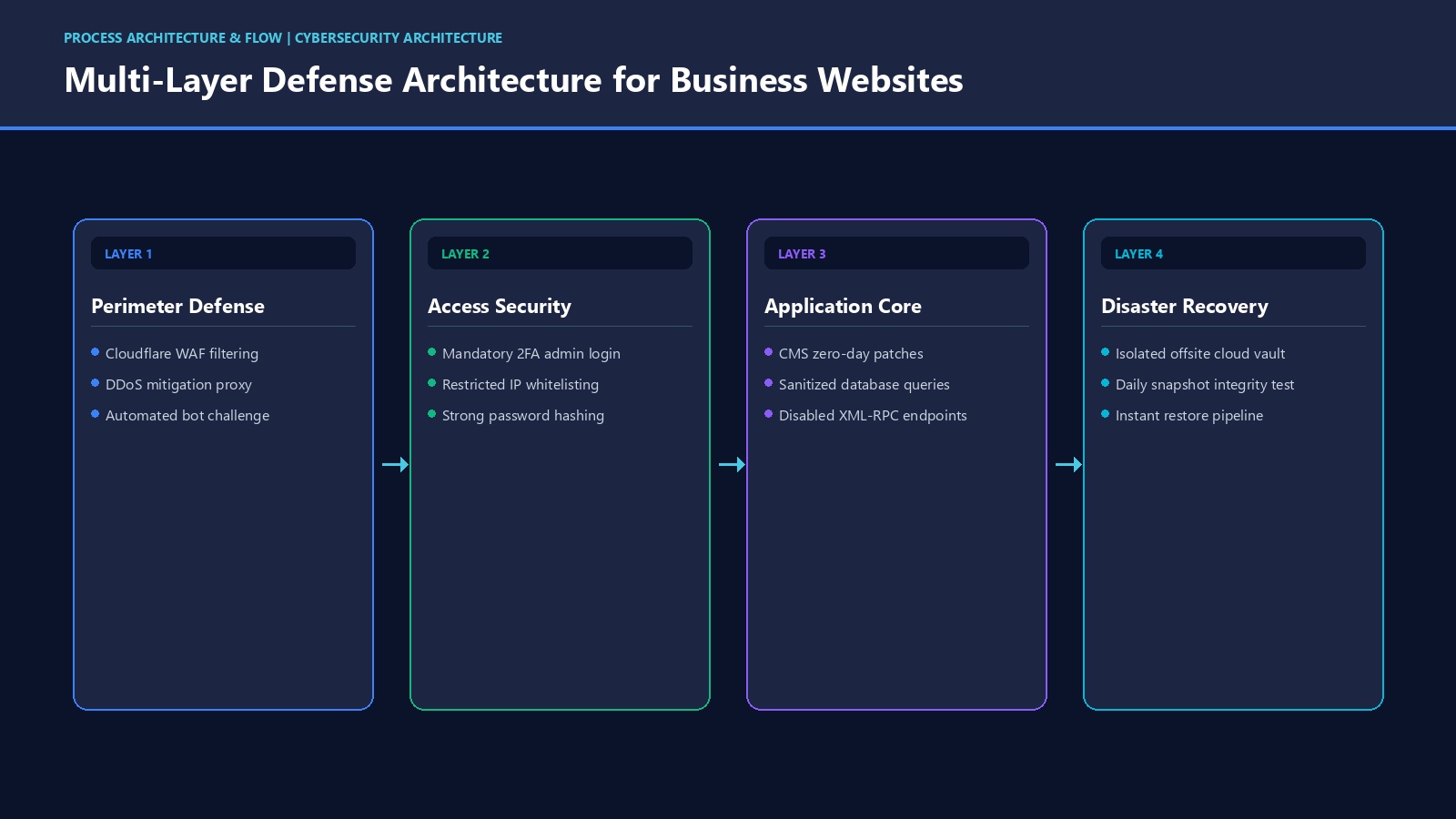
Consider a hypothetical example to make this concrete. A small retail business runs its own website on a popular CMS, built a few years ago by a freelancer who has since moved on. The site "works," so nobody revisits it. One of the plugins installed at launch hasn't been updated since — it still functions, so no one notices anything is wrong.
Then one afternoon, a regular customer messages the business's social media page to ask why clicking the website link redirected their phone to an unrelated advertising page. The owner checks the site on a desktop browser — it looks completely normal. It's only after checking on a different device, and later hearing from a second customer, that the pattern becomes clear: the site is serving different content to different visitors, a classic sign of a compromised plugin being exploited by a bot.

By the time a developer is brought in to investigate, the cleanup involves identifying the compromised files, removing malicious code, resetting every admin credential, and checking whether search engines have flagged the domain. None of this was inevitable — it was the predictable result of a plugin nobody had updated in years, on a site nobody was actively monitoring.

The difference between a well-maintained website and a vulnerable one usually isn't visible on the surface. It shows up in the habits behind the scenes:
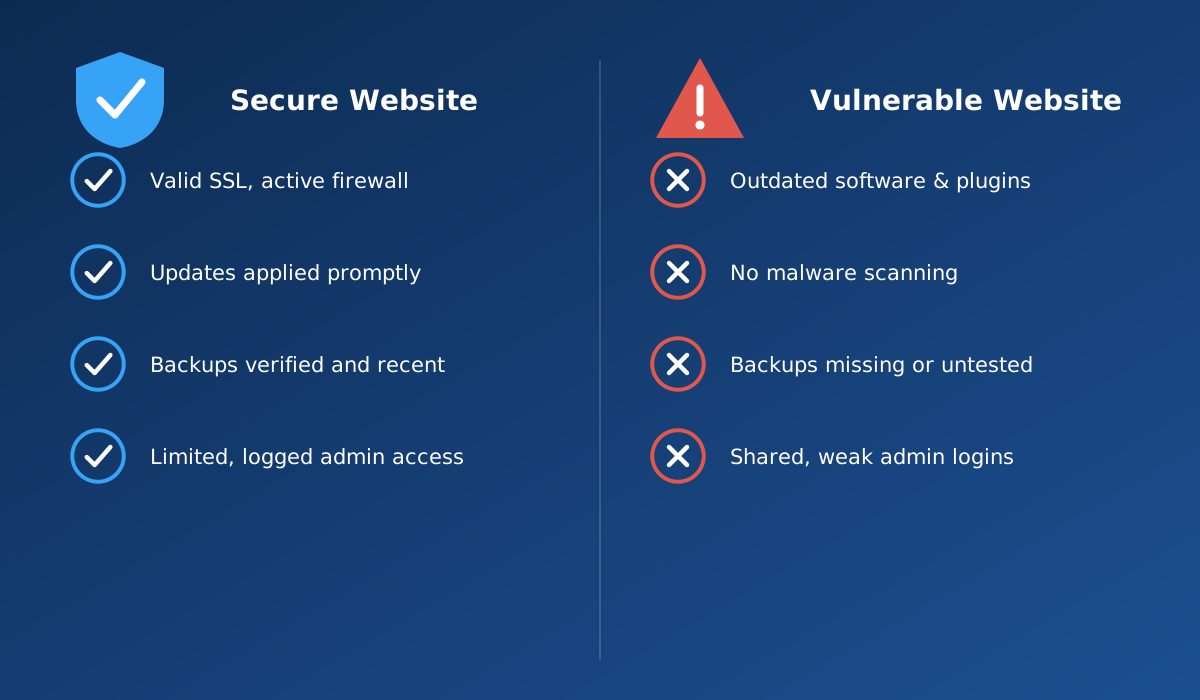
Before going further, it's worth asking a few direct questions about your own website — honestly, not optimistically:
If more than one or two of these questions made you pause, that's useful information, not cause for panic. It simply means security has been assumed rather than verified — a very common starting point. For a more complete, structured version of this review, see our companion article, 12 security checks every business owner should know.
It's tempting to treat website security as a cost centre with no clear return — until something goes wrong, at which point the cost shows up all at once: emergency developer time, hours spent investigating and cleaning up, potential loss of search visibility if the site gets flagged, and the time spent rebuilding customer confidence. None of these costs are fixed or predictable, which is exactly the problem. Prevention is a manageable, planned cost. Recovery is an unplanned one, usually larger, and it arrives at the worst possible time. We go into this in more depth in what happens to your business when your website suddenly goes down or gets hacked.
If you're evaluating whether your current setup — or a prospective developer or hosting provider — actually takes security seriously, ask direct questions rather than accepting general reassurance:
Security and hosting are closely connected — the server environment your site lives on affects how well it can be protected and how quickly problems are caught. If you'd like to understand how hosting, monitoring and ongoing support fit together, our web hosting and support services page covers this in more detail.
Your website should do more than simply exist online. It should build trust, attract the right audience and support your business goals.
Discuss Your ProjectRelated reading: What happens when your website goes down or gets hacked · 12 security checks every business owner should know · Are hidden maintenance costs increasing your expenses?
Common signs include unexpected redirects, strange pop-ups, new admin accounts you did not create, a sudden drop in search rankings, your hosting provider or Google flagging the site, or visitors reporting odd behaviour. Sometimes there are no visible signs at all, which is exactly why regular checks matter more than relying on appearances.
Yes. Most website attacks are carried out by automated bots scanning the internet for known software vulnerabilities, not by someone deliberately choosing your business. Size and visibility rarely matter to an automated scan; outdated software and weak passwords matter a great deal.
No. SSL/HTTPS encrypts the connection between a visitor's browser and your server, which is important and expected by modern browsers, but it does not protect against outdated software, weak passwords, malware, or a compromised plugin. It is one layer among several, not a complete security solution on its own.
As a general practice, core software, themes and plugins should be checked and updated regularly, and security patches should be applied promptly rather than left for a convenient moment. Many successful attacks exploit vulnerabilities for which a fix was already available but simply not installed.
Contact your hosting or support provider immediately, avoid making changes yourself unless you know what you are doing, and check whether a clean, recent backup is available to restore from. Document what you noticed and when, since this helps whoever investigates the incident.
Reliable hosting is an important foundation, but security also depends on how the website itself is maintained — updates, access control, backups and monitoring at the application level. Hosting and ongoing website maintenance work together; neither one alone is a complete answer. See our web hosting services for more on this.
It is ongoing. New vulnerabilities are discovered in common software on a regular basis, which is why security is better treated as continuous maintenance rather than a task you complete once at launch and never revisit.
Or call us now +91 97464 40467