

Most businesses budget for a website the way they'd budget for a one-time purchase: pay to build it, pay a small amount for hosting each year, and consider the job done. Then, eighteen months or two years in, an invoice arrives that doesn't fit that picture at all — an "emergency fix" for a site that suddenly stopped working properly, often costing more than several years of routine upkeep would have.
The invoice feels unexpected, but it rarely is, in hindsight. A website left untouched after launch doesn't stay still — the software underneath keeps aging, plugins fall out of date, licences quietly lapse, and small issues accumulate until something finally breaks in a way that's impossible to ignore. The cost was always there. It just stayed invisible until it wasn't.
This article looks at where those hidden costs actually come from, why they tend to be larger than the maintenance that would have prevented them, and how to budget for a website the way you'd budget for any other business asset that needs upkeep.
A website is easy to mentally file under "one-time project" because that's how the initial experience usually feels — a defined build, a launch date, a final invoice. Ongoing maintenance doesn't have that same clear shape, so it's easy to assume it isn't really needed, especially while the site still "looks fine" day to day.
The problem is that software doesn't stay fine on its own. Security patches are released for known vulnerabilities, browsers change what they support, third-party services update their requirements, and licences for themes or plugins expire. None of this announces itself loudly. It just quietly increases the gap between what your website needs and what it's actually getting — until the gap becomes a visible problem.
Before assuming this doesn't apply to you, it's worth checking for a few familiar patterns. Does your website spending tend to arrive in unpredictable spikes rather than steady, planned amounts? Has a developer ever told you a fix would take longer "because nobody has touched this part of the site in years"? Have you ever discovered a licence, plugin or integration had quietly stopped working weeks before anyone noticed? Has a quick-sounding request ever turned into a much bigger job once someone actually opened up the code? Any one of these on its own might be a coincidence. Several of them together usually point to the same root cause: a website that's being run without any ongoing maintenance plan behind it.
It helps to separate the visible, budgeted cost of a website from everything sitting below the surface:
Hosting and the domain renewal are the visible, expected costs — the tip of the iceberg. Beneath that sits everything that only shows up when something goes wrong: emergency fixes billed at rush rates, sales lost during avoidable downtime, renewals missed until a service simply stops working, developer time spent firefighting instead of improving anything, and the clean-up cost after a preventable security incident. None of these are exotic scenarios; they're the predictable result of a website that's never actively maintained.
There's also a quieter, slower-moving cost that rarely gets its own line item: a website that's gradually falling behind tends to get slower, feel less polished, and work less reliably across devices over time. None of that shows up as an invoice, but it can steadily affect how visitors experience the site and whether they stick around long enough to enquire or buy — a cost that's real even though nobody ever writes it down.
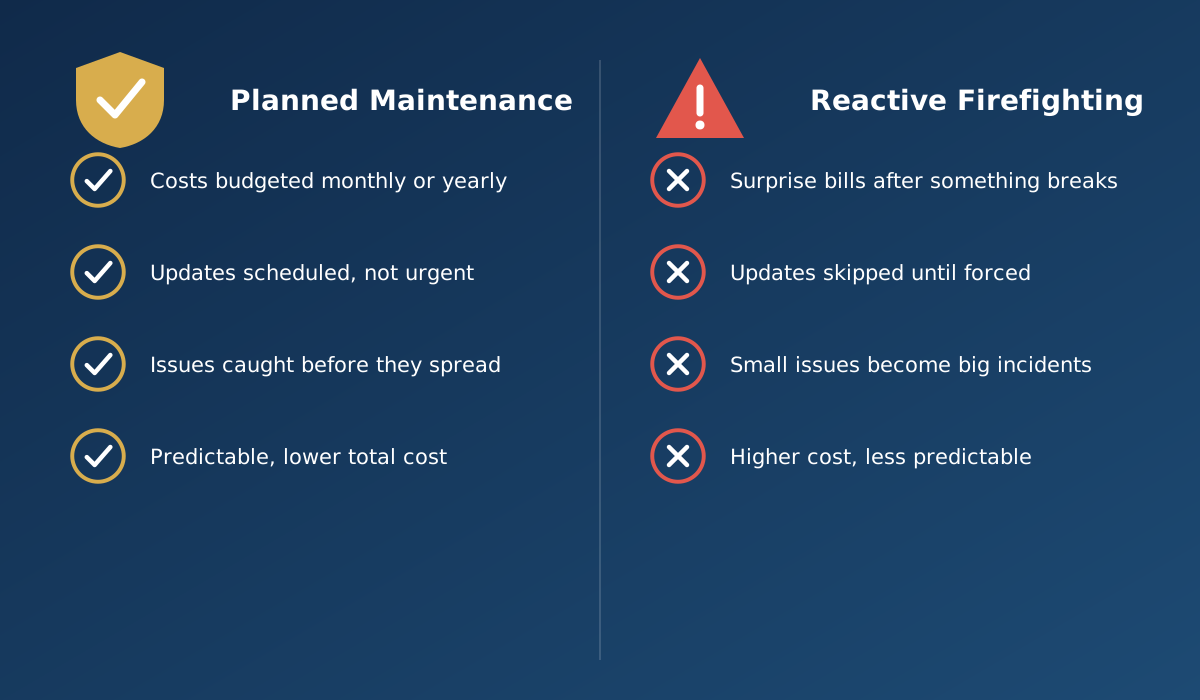
It's also worth understanding why the reactive version of these costs tends to be larger than the planned version of the same work. Urgent work is priced and resourced differently from scheduled work — there's less time to plan, less certainty about the root cause, and often a direct business cost (lost sales, a stalled campaign) running in parallel while the fix happens. The task itself might be identical; the circumstances around it are what drive the cost up.
Consider a hypothetical manufacturing business that launched its website a few years ago and never set up any ongoing maintenance arrangement. For a long time, nothing visibly went wrong, so the gap went unnoticed. Then, within the same few months, three things converged: a plugin license lapsed and quietly disabled a feature on the product catalogue, the original developer had moved on to other work and was no longer readily available, and a routine software update elsewhere on the server broke compatibility with part of the site's older code.
What could have been three small, separate, inexpensive fixes if addressed as they arose instead became one large, urgent project — new developer onboarding time to understand unfamiliar code, emergency-rate work to meet a tight deadline, and lost enquiries while the catalogue was partially broken. The total cost was substantially higher than routine maintenance spread over the same period would have been, and arrived all at once, with no warning.

What makes this scenario realistic rather than extreme is how ordinary each individual piece was. A licence lapsing, a freelancer moving on, a routine server-side update — none of these are unusual events. What turned them into a costly emergency was simply the absence of anyone watching for them, and the absence of a maintenance relationship that would have caught each one separately, long before they had a chance to combine.

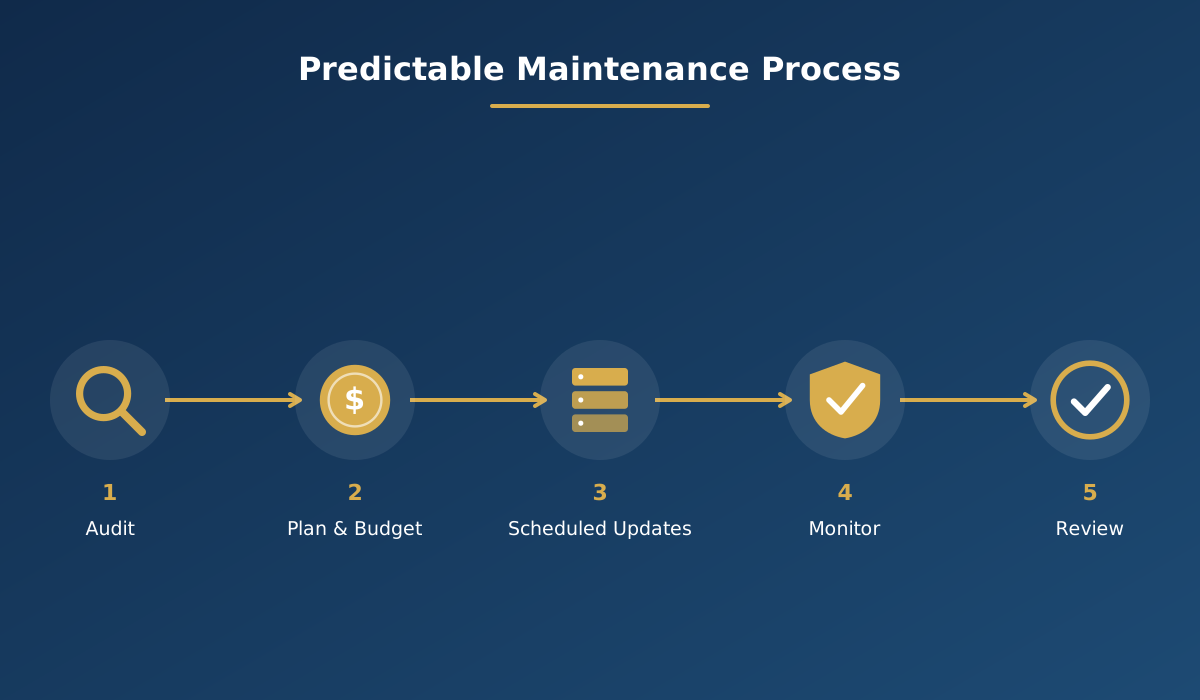
Shifting from reactive to planned maintenance doesn't need to be complicated. It starts with an honest audit of where the website actually stands today, a realistic budget built around what that audit finds, a schedule for routine updates rather than ad-hoc ones, ongoing monitoring in between, and a periodic review to catch anything new. The goal isn't to eliminate every possible issue — it's to make costs predictable instead of sudden, and to catch problems while they're still small.
This connects directly to website security, since many "hidden costs" are really the financial consequence of security basics being skipped. Our articles on whether your website is really safe from hackers and the practical 12-point security checklist cover the prevention side of this same issue in more depth, and what happens when a website goes down or gets hacked looks at what happens when those gaps catch up with a business.
Before approving next year's website budget, or deciding there isn't one needed, it's worth answering these plainly rather than assuming the answers:
When comparing maintenance or support plans, ask specifically what's included versus billed separately — updates, backups, monitoring, response times — rather than relying on a general promise of "ongoing support." A plan that's vague about scope is often where hidden costs sneak back in through the exceptions.
It's also worth asking how a prospective partner handles a website they didn't originally build. If the answer is vague or reluctant, that's a sign they may not be set up for ongoing maintenance work at all — only for new builds. A team that regularly takes over and maintains existing sites tends to have clearer processes for documenting what they find, budgeting for what needs fixing, and keeping you informed along the way, rather than treating every visit as a fresh mystery. Reliable, well-monitored hosting is part of this foundation; see our web hosting and support services for how ongoing monitoring and backups fit into a predictable maintenance approach.
Your website should do more than simply exist online. It should build trust, attract the right audience and support your business goals.
Discuss Your ProjectRelated reading: Is your website really safe from hackers? · What happens when your website goes down or gets hacked · 12 security checks every business owner should know
Hosting keeps your website physically online, but it doesn't update your CMS and plugins, monitor for security issues, fix broken features, or manage backups. Those are separate, ongoing maintenance tasks that hosting alone does not cover. See our web hosting services for how this works together.
An emergency fix usually has to happen under time pressure, often on code nobody has reviewed in a long time, sometimes while the site is already losing business. Routine maintenance addresses the same underlying issues earlier, calmly, and typically at a predictable, lower cost.
Anything that doesn't show up as a predictable, budgeted line item: an emergency developer call-out, sales lost during unplanned downtime, a license or renewal missed until service stops, or the cleanup cost after a preventable security incident.
A useful sign is whether your website-related spending is predictable month to month, or whether it tends to arrive as unplanned, larger invoices after something breaks. Frequent surprise costs usually point to a lack of ongoing, scheduled maintenance.
For most businesses that depend on their website for enquiries or sales, planned maintenance tends to be more cost-effective over time than reacting to problems as they appear, simply because issues are caught and fixed while they're still small and inexpensive.
At minimum, it should cover scheduled software and plugin updates, regular tested backups, uptime monitoring, and a clear process for who to contact when something needs attention — ideally with response times agreed in advance.
Or call us now +91 97464 40467